Four ways a correct DNS record still looks broken
Buying a domain gives you no email. It gives you a name, and nothing on the internet is storing mail for that name yet.
An inbox is a server that has to be online permanently, accept connections from strangers, hold your mail, and be trusted by Gmail. The realistic move is to point the name at someone who already runs one — not because running it is hard, but because a fresh IP address has no sending reputation and spends months in spam folders earning one.
So the setup is small: publish some DNS records, prove you own the domain, done. Mine took about an hour. Roughly five minutes of that was publishing records, and the remaining fifty-five were spent looking at records that were already correct and being told they were not.
The mechanism, briefly
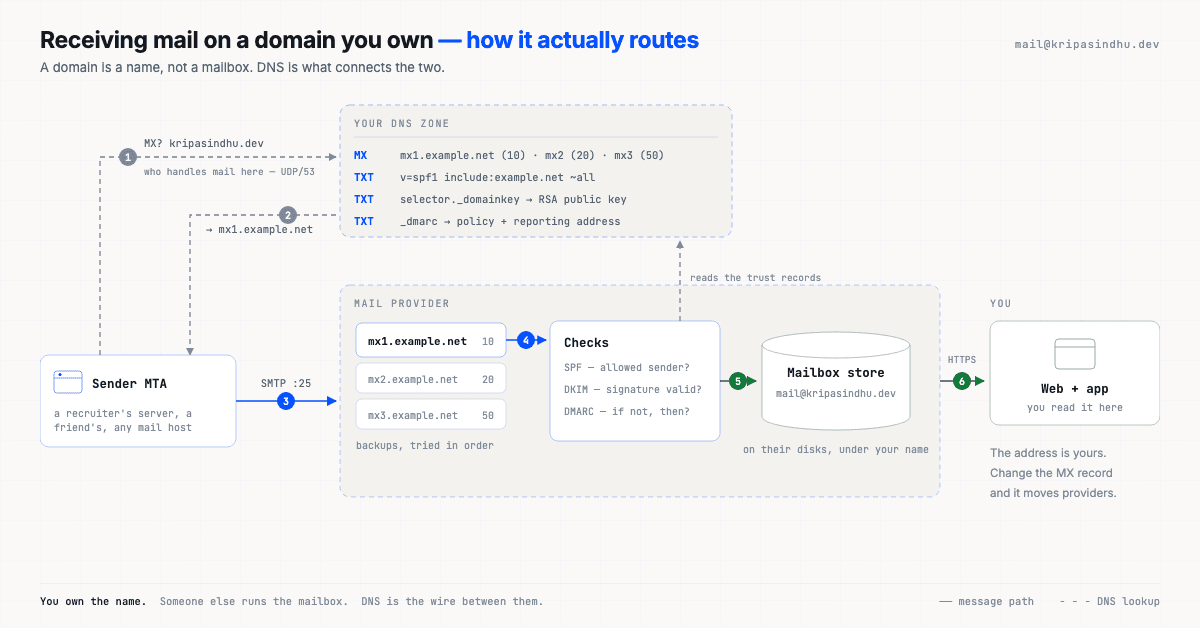
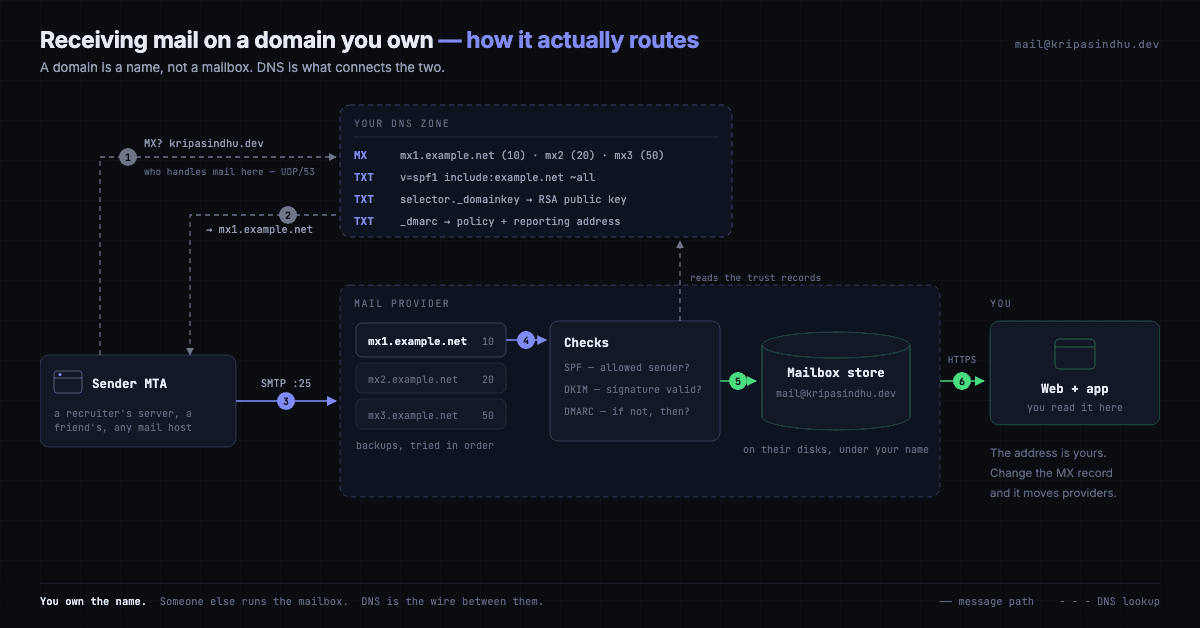
A sending server splits mail@kripasindhu.dev at the @, keeps the domain, and asks DNS one question: who handles mail here? DNS answers with MX records. The sender opens an SMTP connection to the best-priority host that answers, and hands the message over.
$ dig +short MX kripasindhu.dev
10 mx.zoho.in.
20 mx2.zoho.in.
50 mx3.zoho.in.
Three hosts, tried in priority order — 10 first, 50 as the last resort. That is the entire link between a name I own and machines I don't. Change those three lines and the address moves providers without the address itself changing, which is the one structural advantage a custom domain has over a free webmail account.
My DNS is Vercel's, so publishing is a CLI call rather than a form:
vercel dns add kripasindhu.dev @ MX mx.zoho.in 10
vercel dns add kripasindhu.dev zmail._domainkey TXT "v=DKIM1; k=rsa; p=MIGfMA0..."
# SPF and DMARC go in the same way: TXT at the apex, and TXT at _dmarc
Everything after this point is the part nobody writes down.
1. The record was live in 60 seconds and invisible for ten minutes
I published the DKIM record, waited for the 60-second TTL, and clicked Verify. It failed. I re-checked the record with dig, saw it plainly, clicked again. Failed. Republished it. Failed. This went on for about ten minutes, which — it turns out — is exactly the number the zone had promised.
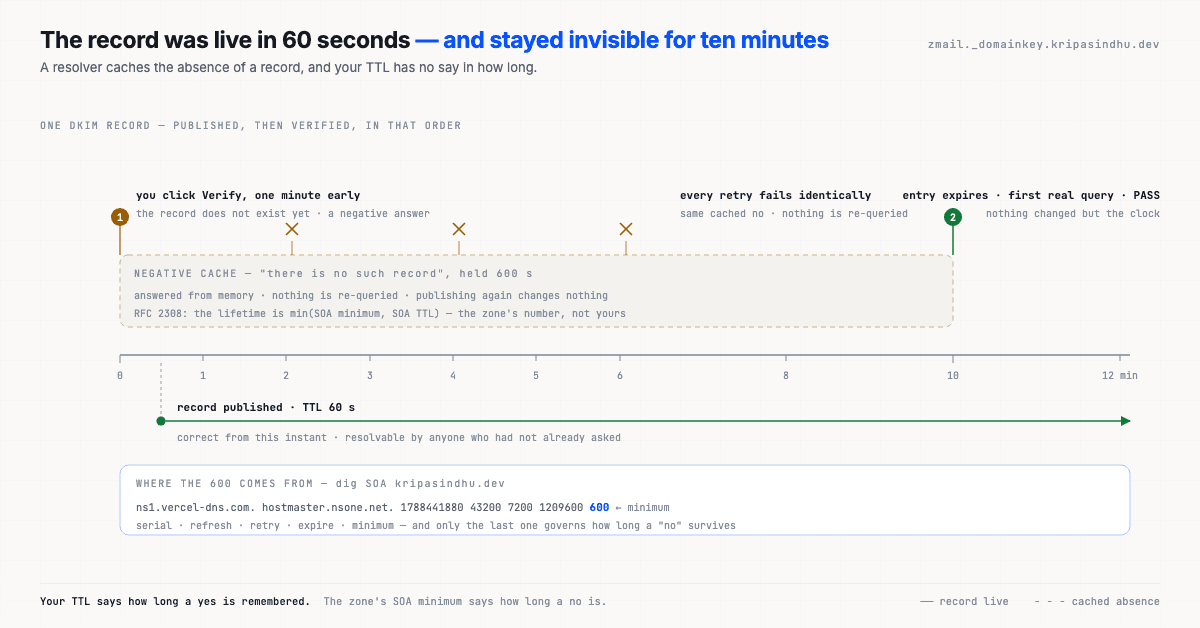
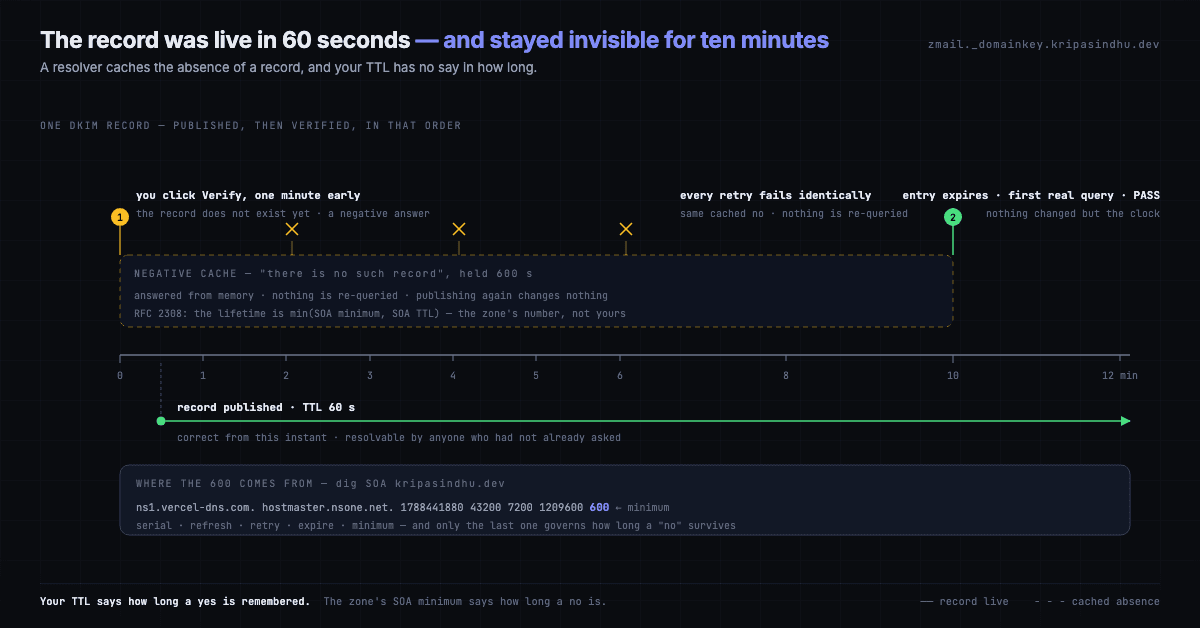
I had queried the name once before publishing it. That query returned a negative answer, and negative answers get cached too — that is RFC 2308, and the lifetime is not the TTL you set on your record. It is the last field of the zone's SOA:
$ dig +short SOA kripasindhu.dev
ns1.vercel-dns.com. hostmaster.nsone.net. 1788441880 43200 7200 1209600 600
#                                                                       ^^^
#  serial      refresh  retry  expire  minimum → negative cache lifetime
600 seconds. My record's TTL was 60:
$ dig @ns1.vercel-dns.com +noall +answer TXT zmail._domainkey.kripasindhu.dev
zmail._domainkey.kripasindhu.dev.	60	IN	TXT	"v=DKIM1; k=rsa; p=MIGfMA0GCSqGSIb3DQEB..."
So the resolver in front of the verifier held "there is no such record" for ten minutes, and during those ten minutes it never asked again. Republishing changed nothing, because nothing was being queried. The useful rule: your TTL governs how long a yes is remembered, and the zone's SOA minimum governs how long a no is. If you can, look the name up after you publish it, not before — a negative answer is the most expensive DNS response you can provoke.
This is also why "clear your DNS cache and try again" often does nothing. The cache that matters is the recursive resolver your provider's checker uses, several networks away, and you cannot flush it. You can only outlast it.
2. The dashboard was reading a different data centre
While waiting out the cache I was also being told, in a console, that the DKIM key could not be verified. It could — by anything I pointed at it. The mailbox lives in Zoho's India region, and I was checking it from the .com admin console rather than .zoho.in. Same product, same login, different data centre, and the .com console has no view of an .in account's DNS state.
There is no clever lesson here beyond a practical one: when a provider is regionalised, the console URL is part of the configuration. I lost more time to that than to anything technical, because the failure was indistinguishable from a real DNS failure — a red cross next to a record that was demonstrably live.
3. A TXT record is not a string, it is a list of strings
DKIM publishes an RSA public key in a TXT record. Mine:
$ dig +short TXT zmail._domainkey.kripasindhu.dev
"v=DKIM1; k=rsa; p=MIGfMA0GCSqGSIb3DQEBAQUAA4GNADCBiQKBgQClzpHjJw2VZd4Y...QIDAQAB"
234 characters, of which 216 are the base64 key. That fits in one piece, and the reason it has to fit in a piece is a wire-format detail: a TXT record is a sequence of character-strings, and each one is length-prefixed with a single byte. One byte caps a string at 255 characters. Anything longer has to be split, and the receiver concatenates the pieces:
zmail._domainkey  IN  TXT  ( "v=DKIM1; k=rsa; p=MIIBIjANBgkq..."
                             "...rest of the key" )
This is why a 2048-bit DKIM key breaks setups that a 1024-bit key sails through — the longer key does not fit in 255 characters, and a control panel that pastes your value into a single string produces a record that is silently invalid. If you ever see DKIM work at 1024 bits and fail at 2048 with no other change, this is almost always it.
Which raises the obvious question about the key above.
4. Verify the key yourself instead of trusting the checkmark
The dashboard says DKIM is valid. The dashboard is also the thing that was wrong in §2. The published record is a public key, so you can just parse it:
P=$(dig +short TXT zmail._domainkey.kripasindhu.dev | tr -d '"' | sed 's/.*p=//')
printf -- "-----BEGIN PUBLIC KEY-----\n%s\n-----END PUBLIC KEY-----\n" \
  "$(echo "$P" | fold -w 64)" > key.pem
openssl rsa -pubin -in key.pem -text -noout | head -2
Public-Key: (1024 bit)
Modulus:Two things worth knowing from that one line. First, the record really is a well-formed RSA key and not a truncated paste — if it were, openssl would fail here rather than at some future receiver. Second, it is 1024-bit, because that is what the free tier issues. RFC 8301 sets 1024 as the floor and recommends 2048, so this is acceptable rather than good, and moving to 2048 means confronting §3 for real.
SPF is a budget, not a list
SPF looks like an allowlist. It is really a small recursive program with a hard limit: a receiver must not perform more than 10 DNS lookups while evaluating it (RFC 7208 §4.6.4). Exceed it and the result is permerror — not a fail, a broken evaluation, which receivers treat about as kindly as a fail.
Every include: spends one — and the single include a provider hands you often spends more than one, because it nests. Publishing include:zoho.in buys this:
$ dig +short TXT zoho.in | grep spf
"v=spf1 include:spf.zoho.in -all"

$ dig +short TXT spf.zoho.in | grep spf
"v=spf1 ip4:103.117.158.0/24 ip4:103.89.74.0/24 ip4:169.148.146.0/23 ... -all"
Two lookups for one include, and the chain terminates in ip4: mechanisms, which cost nothing further. That is comfortable, and worth re-counting the day a marketing tool, a helpdesk and a CI mailer each want an include: of their own. Four vendors is where people usually discover the limit exists.
Note the last mechanism in that chain: -all, a hard fail — anything not listed is unauthorised, full stop. The alternative is ~all, a soft fail: suspicious, deliver anyway. Soft is the sane opening position on a domain you configured an hour ago, because a hard fail turns your own misconfiguration into mail nobody ever receives and nobody tells you about. It is an opening position, though, not a destination.
What DMARC actually adds
SPF and DKIM are usually described as two ways of checking the sender. They are not. They check two domains that nobody ever sees.
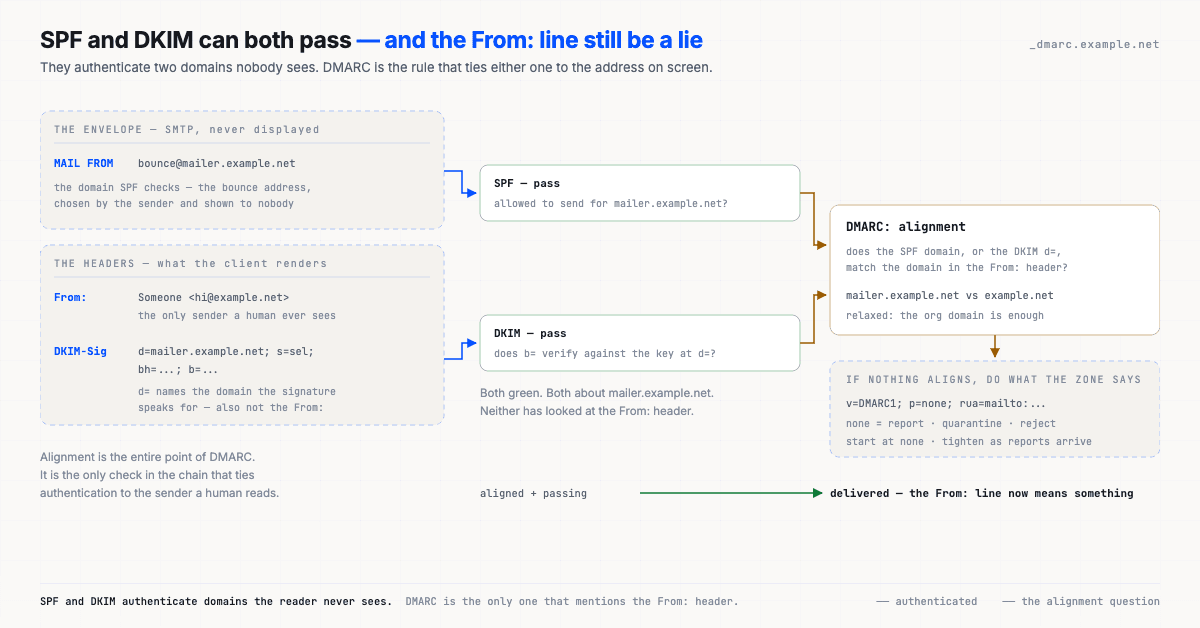
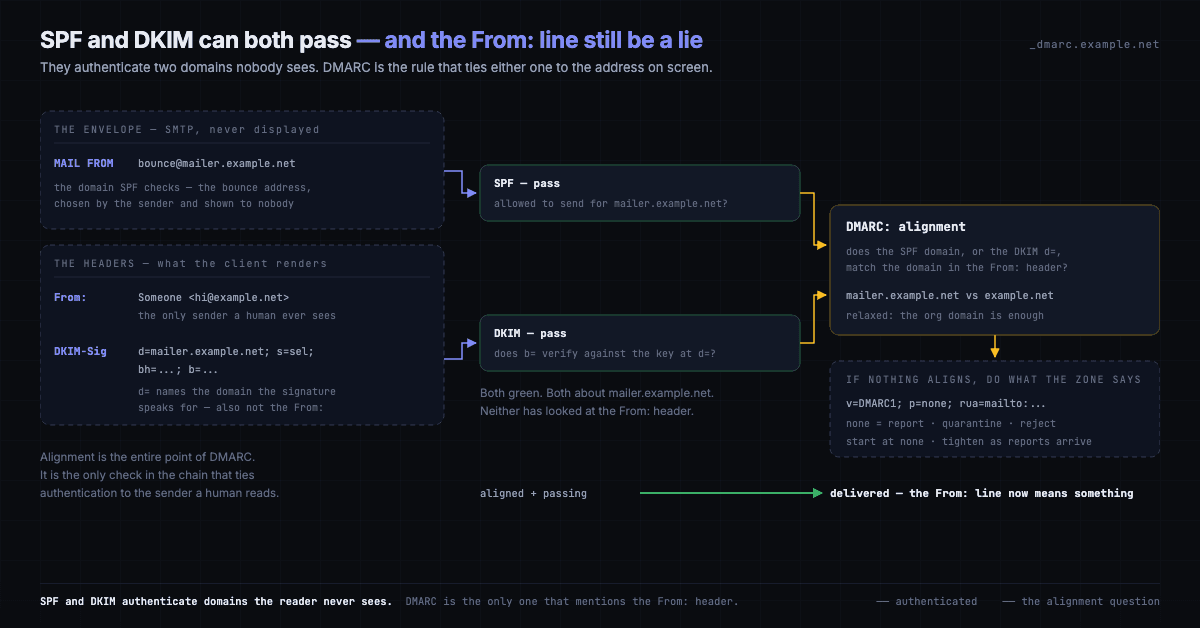
SPF checks the envelope MAIL FROM — the bounce address, chosen by the sender, never rendered by a mail client. DKIM checks the d= domain named inside the signature. Neither of them looks at the From: header, which is the only sender a human reads. A message can pass both while displaying anyone's name.
DMARC is the rule that ties them together: at least one of those authenticated domains must align with the From: domain, and if neither does, the receiver applies whatever policy the domain publishes.
_dmarc IN TXT "v=DMARC1; p=none; rua=mailto:reports@example.net"p=none means: check, report, act on nothing. It is where a domain starts, not where it stays. rua collects aggregate reports from receivers, so you learn who is already sending as you before you tell the internet what to do about it — and the ladder from there is quarantine, then reject, each rung a decision made on those reports rather than on setup day.
Where it ended up
| Record | Value | What it does |
|---|---|---|
MX | mx / mx2 / mx3 .zoho.in at 10 / 20 / 50 | where mail for the name is delivered |
TXT @ | SPF — the provider include:, then an all mechanism | which servers may send as me; that one include costs 2 of the 10 lookups |
TXT zmail._domainkey | 1024-bit RSA public key, 234 chars | lets receivers verify the signature |
TXT _dmarc | DMARC — a policy and a rua reporting address | ties SPF and DKIM to the visible From: |
Four records, an hour, and one durable property: the address is portable. The provider is a tenant. Change the MX records and mail@kripasindhu.dev keeps working somewhere else — which is not true of any address you rent from a company that also owns the name.
The thing I would tell myself before starting: everything I published was correct within a minute, and every tool that disagreed was disagreeing for a reason that had nothing to do with the record. A cached absence, a console pointed at the wrong region, a length limit in a wire format from 1987. DNS is not slow to change. It is slow to un-know.