JSON.stringify invented my bug
Before you read on, try this one. What does each line print?
JSON.stringify({ customerId: { $ne: undefined }, isPosted: undefined });
JSON.stringify([undefined]);
JSON.stringify({ total: NaN });
JSON.stringify({ seen: new Map([['a', 1]]) });
JSON.stringify({ err: new Error('boom') });
Take a guess at each. Here are the answers:
{"customerId":{}}
[null]
{"total":null}
{"seen":{}}
{"err":{}}
No line threw an error or warned you, and every output is valid JSON. But in each one, the printout says something different from what the object holds. The error has lost its message, the populated Map looks empty, and the NaN looks like a value someone set to null.
That first line is the one that got me. I was debugging with an AI assistant, and together we read {"customerId":{}} as a broken database filter. The assistant then kept building on that reading, one confident step at a time, and I kept accepting it. The filter was fine.
Why it happens
JSON can only hold six kinds of value: objects, arrays, strings, numbers, booleans and null. JavaScript has many more. So JSON.stringify has to decide what to do with everything else, and it never tells you what it decided.
Four rules explain nearly all of the surprises:
1. A value JSON can't write gets dropped from an object. That covers undefined, functions and symbols. The key disappears with it.
2. The same value in an array becomes null. An array can't drop an item without moving the ones after it, so [undefined] becomes [null]. This is why the same value can look missing in one place and like a real null in another.
3. Only own enumerable properties get written. A Map keeps its entries internally, so it prints as {}. An Error keeps message and stack as non-enumerable properties, so it prints as {} too.
4. An object can decide for itself. If it has a toJSON method, that result is printed instead. This is why a Date comes out as a string, and why any object can print something other than what it holds.
Here is the full list to keep nearby:
| Value | Inside an object | What you might wrongly conclude |
|---|---|---|
undefined, function, symbol | Key is gone | "The field was never set" |
undefined in an array | null | "Someone stored a null" |
NaN, Infinity | null | "The value was null, not a bad calculation" |
Map, Set, RegExp | {} | "It's empty" |
Error | {} | "There was no error detail" |
Date | ISO string | "It's already a string" |
BigInt, circular reference | Throws TypeError | At least this one is loud |
How it fooled me
An endpoint at work was returning HTTP 200 with empty data. It builds a Mongo filter, and some conditions compare a field to undefined. That looked suspicious, so we printed the filter:
const q = Order.find({ customerId: { $ne: undefined }, isPosted: undefined });
console.log('getFilter:', JSON.stringify(q.getFilter()));
// getFilter: {"customerId":{}}
Now you can see what happened. Rule 1 removed $ne and isPosted. But neither of us read it that way. The assistant wrote this check, read the output as a mangled filter, and turned it into a theory: undefined destroys the condition, so the query matches nothing.
Print it another way and the damage goes away:
util.inspect(q.getFilter());
// { customerId: { '$ne': undefined }, isPosted: undefined }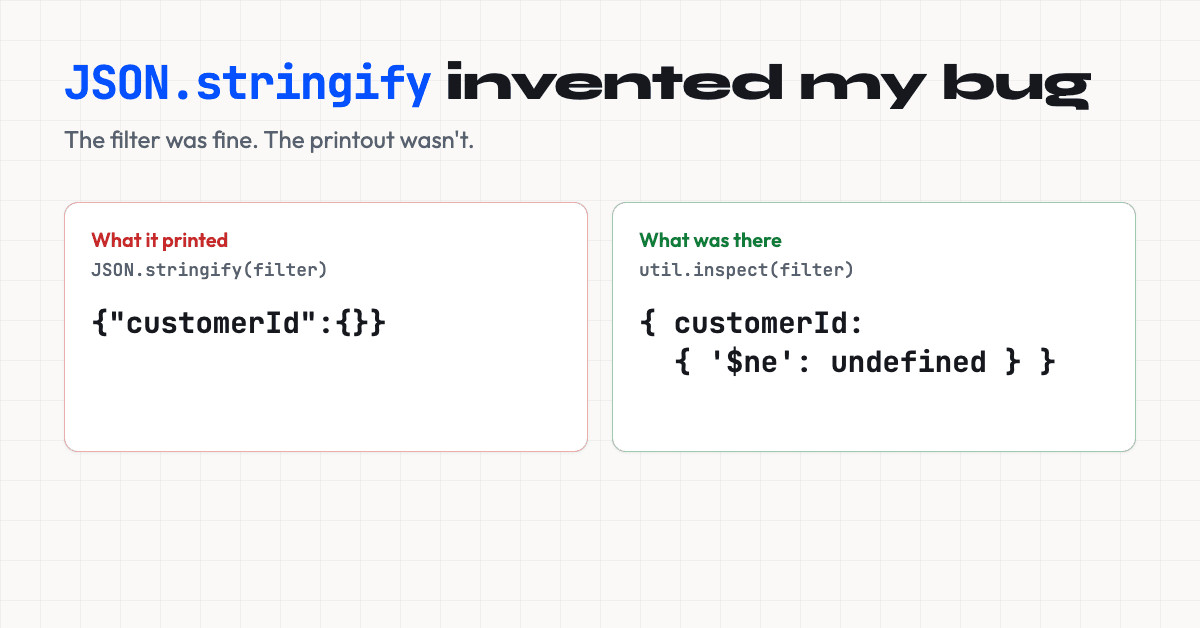
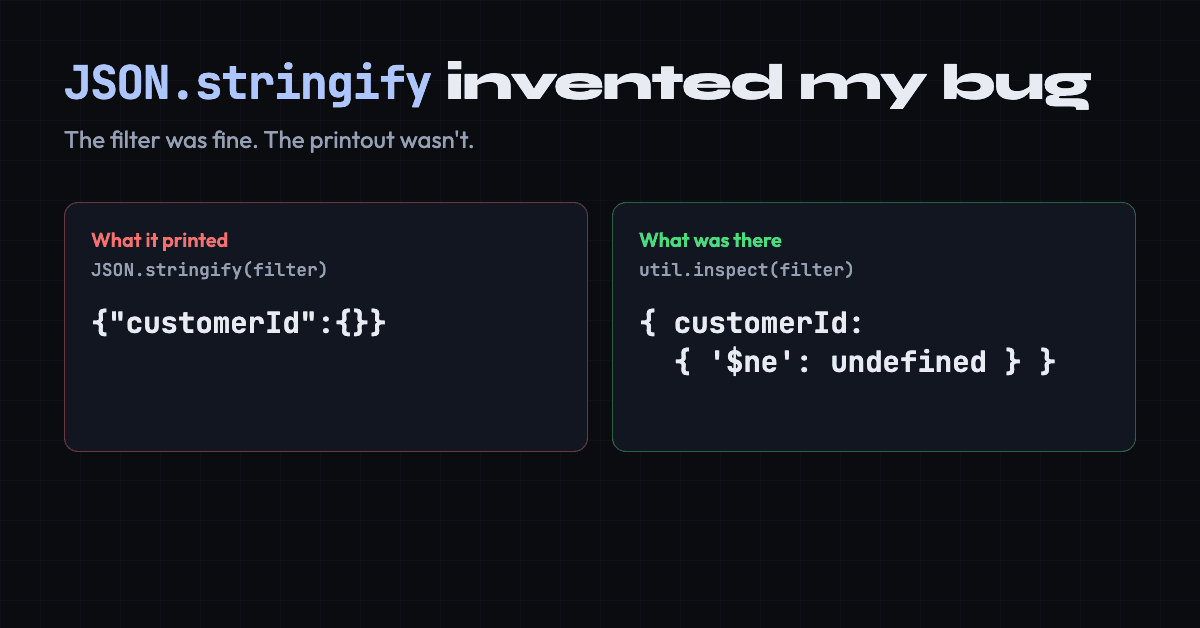
We didn't do that. Instead, the story grew, and each step rested on the one before it:
- The printout became a finding. Our notes recorded the theory as "empirically verified", with the empty operator as the explanation.
- The finding became a test. Replaying the inferred filter in Mongo returned 0 results, which felt like proof. But a query shaped by a printout only tests the printout.
- The test became a fix. Conditions were changed, and the endpoint returned 7 results, which felt like a before and after. Nobody had measured the before.
None of these steps looked careless. Each was specific, reasoned and consistent with the last, and that was the problem. An AI assistant is very good at producing the next plausible step, and it doesn't naturally stop to ask whether the first one was true. I had the same chance to ask at every step, and I didn't.
The real test took about two minutes: running the unmodified code over HTTP, as a real caller would.
| Request, on the code we thought was broken | Results |
|---|---|
| The correct company ID | 7 |
| No company ID | 11 |
| The ID from the bug report | 0 |
The endpoint was never broken. The bug report had passed our internal company ID to a parameter that filters on another system's ID, so empty was the right answer. No code change shipped.
To its credit, the assistant raised the doubt itself once real execution results came in, and said the decisive test was running the old code. Then the story started again. Our written correction said getFilter() showed the filter before casting, and that Mongoose casts undefined to null at execution. It explained the numbers and sounded right, and we didn't test it either. It never mentioned JSON.stringify. I only found the real culprit while writing this article.
How to spot the trap
Stop and print it a second way if you see any of these in JSON.stringify output:
{}where you expected data. It could be aMap, aSet, anError, a RegExp, or an object whose only values wereundefined.- A key you were sure was set is missing. It may be there and hold
undefined. - A
nullyou can't explain. It could beNaN,Infinityor anundefinedin an array. - Logs saying
{"err":{}}. The error happened, but your logging threw away the detail. - The output looks impossible. If an object seems to contradict the code that built it, suspect the printer before the code.
It also bites beyond debugging, because the same rules run wherever JSON.stringify does:
// A request body: the key never reaches the server
JSON.stringify({ name: 'a', email: undefined });
// {"name":"a"}

// A "deep clone": keys vanish and types change
JSON.parse(JSON.stringify({ a: undefined, d: new Date(0), n: NaN }));
// { d: '1970-01-01T00:00:00.000Z', n: null }
What to print instead
In Node, use util.inspect. It shows the object as it is:
util.inspect({ m: new Map([[1, 2]]), n: NaN, e: undefined, r: /x/ });
// { m: Map(1) { 1 => 2 }, n: NaN, e: undefined, r: /x/ }
By default it collapses deep nesting into [Object], so pass { depth: null } to see everything.
If you do need JSON, say for a log pipeline, a replacer function can label what would otherwise be lost:
const reveal = (key, value) => {
  if (value === undefined) return '<undefined>';
  if (typeof value === 'number' && !Number.isFinite(value)) return `<${value}>`;
  if (value instanceof Map) return { '<Map>': [...value] };
  if (value instanceof RegExp) return `<regexp ${value}>`;
  return value;
};

JSON.stringify({ s: { $ne: undefined }, tag: undefined, n: NaN }, reveal);
// {"s":{"$ne":"<undefined>"},"tag":"<undefined>","n":"<NaN>"}
Errors need handling of their own, for example by logging err.message and err.stack explicitly.
So what did Mongo receive?
Neither printout can answer this, because both show the object in your process, not what the database got. MongoDB's profiler can. With three documents, one with s set, one with s: null and one without s, on Mongoose 5 to 9 and MongoDB 6.0.14:
| Filter | Server received | Matches |
|---|---|---|
{ s: { $ne: undefined } } | { s: { $ne: null } } | 1 |
{ s: undefined } | { s: null } | 2 |
So undefined became null, but it isn't always safe. The driver option ignoreUndefined: true really does strip it, which makes our printout's story come true:
await Model.deleteMany({ s: undefined });
// default:                 deleted 2 of 3
// ignoreUndefined: true:   deleted 3 of 3
With that option the filter reaches the server as {}, which matches everything. I measured the delete on Mongoose 5.13.13 and 9.12.0. If you use the option, check filter values before they reach a write.
What to take away
JSON.stringifyis a converter, not a viewer. Its output tells you what JSON can hold, not what your object holds.- When output looks impossible, print it a second way before you believe it.
- Never test a query copied from a printout. Run the real code, unmodified, through the real path.
- To know what another system received, ask that system.
- When debugging with AI, ask what the current step rests on, and check that first. A long chain of confident answers is one claim until something independent tests it.